
 By
Chethan Rao
Published 14 minutes ago
By
Chethan Rao
Published 14 minutes ago
Chethan is a reporter at Android Police, focusing on the weekend news coverage for the site. He has covered tech for over a decade with multiple publications, including the likes of Times Internet, Guiding Tech, and Android Headlines, to name a few. Chethan's love for Android dates back to the days of the Samsung/Google Nexus S, with his first Android phone being the HTC Desire HD back in 2010. Away from work, he's on the lookout for live cricket streams or NBA highlights. He also enjoys the occasional hour or two of console/mobile gaming whenever time permits.
Sign in to your Android Police account Summary Generate a summary of this story follow Follow followed Followed Like Like Thread Log in Here is a fact-based summary of the story contents: Try something different: Show me the facts Explain it like I’m 5 Give me a lighthearted recapWhile some recent Google Photos updates have been fairly exciting, the same can't be said about all of them. In July, the app's perspective correction tool disappeared following the rollout of the updated image editor interface, leaving users without an option to perform a basic editing task.
Google acknowledged the tool's disappearance shortly after the issue was brought to light, while also promising to "restore" perspective correction in a forthcoming update. Well, it's been over three months since then, and we're finally seeing indications of the tool's imminent comeback.
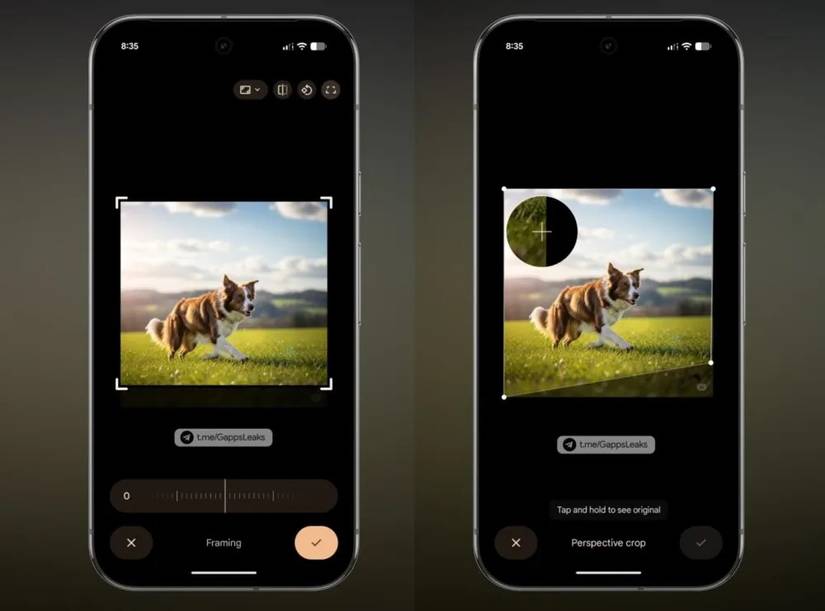
The code sleuths at Android Authority have looked through a "recent build" of the Google Photos app to uncover evidence of the perspective crop tool's re-release. It's currently not visible to everyone, although the publication managed to surface it by tinkering with the app's code.
It shouldn't be long until perspective crop is widely rolled out
 Credit: Android Authority
When available, the perspective crop icon will appear while cropping a portion of the photo or when tapping the shortcut for image framing at the top left. It works exactly as you would expect and will let you straighten or fix distorted angles in photos as and when required. I'm not currently seeing it on the Photos app, which isn't surprising since it had to be manually activated by the folks at Android Authority.
While we now know the tool's return is imminent, it's still unclear when that day will come. One can only hope that this feature progresses through testing soon enough and makes its wider appearance in a forthcoming update to Google Photos.
Android Authority also uploaded a video demo of the perspective correction tool in action:
Perspective correction isn't one of those tools that every Google Photos user would have used. However, for people who extensively capture and edit images using Google Photos, not having access to this photo editing tool is a big miss.
A fair few users (including me) rely on the tool to straighten up images of documents using the Photos app. Thankfully, Google's own Snapseed app, along with several third-party alternatives, still offers perspective correction for images.
Aside from this tool's reintroduction, the developers are hard at work to bring more AI features to the gallery app. We've recently seen evidence that the "Ask Photos" experience could be integrated directly into the image viewer. Meanwhile, Photos is also developing a feature that turns your photos/selfies into memes. So it's safe to say Google's gallery app is not quite done with AI features.
-
 Applications
We want to hear from you! Share your opinions in the thread below and remember to keep it respectful.
Be the first to post Images Attachment(s) Please respect our community guidelines. No links, inappropriate language, or spam.Your comment has not been saved
Send confirmation emailThis thread is open for discussion.
Be the first to post your thoughts.
- Terms
- Privacy
- Feedback
 2 days ago
Realme GT 8 Pro review: A chaotic mix of brilliant cameras and baffling design choices
 2 days ago
Perplexity's Atlas competitor debuts on Android
 2 days ago
I finally found the best expense tracker app on Android after years of switching back and forth
 2 days ago
Black Friday is almost here, but you can start saving now
Trending Now I lost my creative spark and these apps pulled me out of the dark — I'm overflowing with ideas
 This Garmin powerhouse outclasses every 'Ultra' watch, and calling it a must-buy feels like an understatement
 Samsung's new PC browser is a decade too late to be a Chrome killer