 Credit: Lucas Gouveia / Android Police | ArtHub02 / Shutterstock
 By
Rajesh Pandey
Published 47 minutes ago
Rajesh started following the latest happenings in the world of Android around the release of the Nexus One and Samsung Galaxy S. After flashing custom ROMs and kernels on his beloved Galaxy S, he started writing about Android for a living. He uses the latest Samsung or Pixel flagship as his daily driver. And yes, he carries an iPhone as a secondary device. Rajesh has been writing for Android Police since 2021, covering news, how-tos, and features. Based in India, he has previously written for Neowin, AndroidBeat, Times of India, iPhoneHacks, MySmartPrice, and MakeUseOf. When not working, you will find him mindlessly scrolling through X, playing with new AI models, or going on long road trips. You can reach out to him on Twitter or drop a mail at [email protected].
Sign in to your Android Police account
Summary
Generate a summary of this story
follow
Follow
followed
Followed
Like
Like
Thread
1
Log in
Here is a fact-based summary of the story contents:
Try something different:
Show me the facts
Explain it like I’m 5
Give me a lighthearted recap
By
Rajesh Pandey
Published 47 minutes ago
Rajesh started following the latest happenings in the world of Android around the release of the Nexus One and Samsung Galaxy S. After flashing custom ROMs and kernels on his beloved Galaxy S, he started writing about Android for a living. He uses the latest Samsung or Pixel flagship as his daily driver. And yes, he carries an iPhone as a secondary device. Rajesh has been writing for Android Police since 2021, covering news, how-tos, and features. Based in India, he has previously written for Neowin, AndroidBeat, Times of India, iPhoneHacks, MySmartPrice, and MakeUseOf. When not working, you will find him mindlessly scrolling through X, playing with new AI models, or going on long road trips. You can reach out to him on Twitter or drop a mail at [email protected].
Sign in to your Android Police account
Summary
Generate a summary of this story
follow
Follow
followed
Followed
Like
Like
Thread
1
Log in
Here is a fact-based summary of the story contents:
Try something different:
Show me the facts
Explain it like I’m 5
Give me a lighthearted recap
I've used Gmail since probably as long as I've been on the internet.
Over the years, Google's email service has evolved to offer smarter inbox management and spam protection. But as with any free service, it has also become crowded with ads and data-driven features.
A recent slip from Gmail's spam filter forced me to look at alternatives, and Proton Mail's privacy-focused approach ultimately won me over.
 Related
7 things I love about Proton Mail that Gmail lacks
Related
7 things I love about Proton Mail that Gmail lacks
Proton Mail perks you are missing out on
Posts 4 By Parth Shah Nov 18, 2024The problem with Gmail
Convenience comes at the cost of privacy
There's a reason Gmail is the world's most popular email service. When I first started using it, I barely thought about privacy.
Back then, Google wasn't as aggressive with ads or data collection in the name of personalization.
That's no longer the case, and it makes me uneasy, especially since my Gmail inbox holds so much sensitive information about my life and online accounts.
To be clear, this isn't a security issue. Google's security protocols are excellent, so I'm not worried about someone breaking into my account.
What bothers me is the profiling and data collection, even when Google insists it's anonymous.
Another issue is that since I've been using my Gmail account for over a decade now, it is widely exposed and has been part of a few data breaches. That results in a ton of incoming spam.
While Gmail is typically good at blocking those emails, it still fails every once in a while.
These issues eventually forced me to consider a more privacy-focused email provider, and I landed on Proton Mail. It's not a new service — it has been around for over a decade, debuting in 2014.
On-device AI writing assistant
Privacy-first AI
I like Gmail's AI-powered "Help me write" feature, as it makes replying to emails a breeze. But I don't trust Google either.
I don't want it to train its AI models on my data to improve Help me write and other similar features.
Proton Mail also comes with a Writing Assistant feature that uses AI to format my emails or adjust their tone. Unlike Gmail though, I've the option to run the AI models on-device entirely.
When enabled, Proton downloads the LLM on my device, which is a relatively big download. After it's done, the Writing Assistant can even work offline.
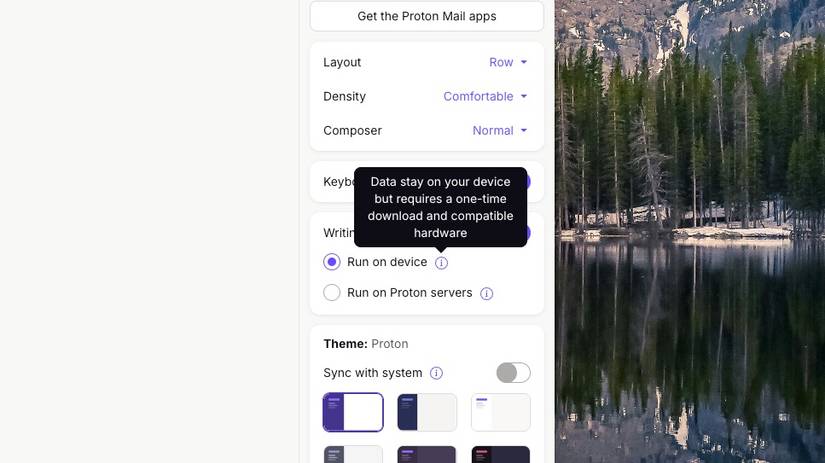
This approach means that I had to download the AI model on both my primary desktop and laptop separately. Not annoying, but this could pose a problem if you have an older PC or don't have access to high-speed internet.
Even otherwise, Proton promises that when running Writing Assistant off its servers, it does not keep any user logs or read your data.
There's one catch here, though: Proton Mail's Writing Assistant is only available on PCs. It does not work on phones.
Keeping my primary inbox private
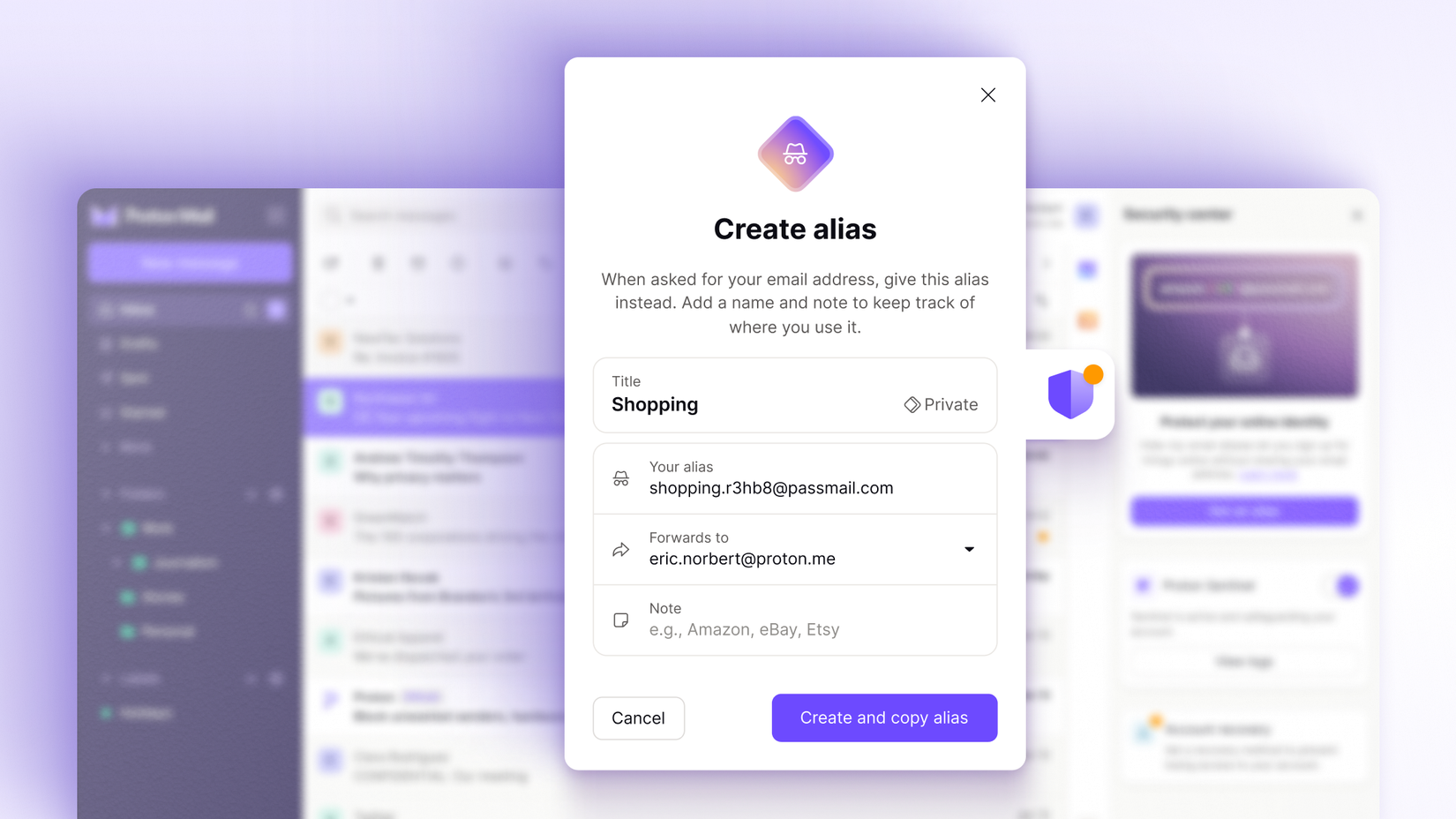
Using disposable aliases to keep spam away
 Credit: Proton Mail
I frequently sign up for new services and end up sharing my email address with a lot of people. In many such cases, I don't want to share my primary email address for privacy reasons.
That's where Proton Mail and Proton Pass' Hide-my-email aliases are useful to have.
As a Proton Pass user, I can seamlessly generate burner email IDs when signing up for a new service. Any incoming mail to this address automatically lands in my inbox.
If it ever starts attracting spam or unwanted emails, I can seamlessly turn off the alias to cut it off completely.
While Gmail supports aliases, there's no option to create burner email IDs. And in some cases, this poses a privacy risk.
Another highlight of Proton Mail is that it natively blocks pixel trackers in emails. So, marketers won't be able to track when I open an email, how many times I've read it, or my location.
A note on Proton Mail's encryption
The limits and strengths of Proton's encryption
Encryption is a key selling point of Proton Mail. When sharing sensitive information, you'd want your emails to be encrypted, ensuring no one but the recipient can read them.
Still, this might not be the reason to pick Proton Mail over Gmail.
Technically, Proton Mail supports end-to-end encryption (E2EE). There's a big catch, though: only emails sent to another Proton Mail account are encrypted.
So, any emails that I send to non-Proton accounts, including Gmail users, are not protected using E2EE.

 Close
Close
That's not Proton's fault, as that's how E2EE works across email standards.
Even with end-to-end encryption, some metadata, such as the subject line and the email addresses, is not fully protected by E2EE.
Like Gmail's Confidential mode, Proton Mail allows sending password-protected emails, securing its content with E2EE.
On the positive side, Proton Mail still protects your inbox using zero-access encryption, meaning Proton itself can't read your stored messages.
Your inbox remains private even if someone inside the company tries to access it or if Proton receives a data request from authorities.
Gmail does more, but Proton does it better for me
Gmail is a more compelling option if you prefer convenience. Proton Mail's mobile app, while decent, is not as good as Gmail.
Giving up on Gmail also means missing out on deep ecosystem integration, especially with Docs, Sheets, and Gemini.
If there's one service where I can't afford to compromise on privacy, it's email. And for that reason alone, Proton Mail wins for me, offering a peace of mind that Gmail cannot match. Giving up a bit of convenience is a small price to pay for it.
-
 Applications
We want to hear from you! Share your opinions in the thread below and remember to keep it respectful.
Reply / Post Images Attachment(s) Please respect our community guidelines. No links, inappropriate language, or spam.Your comment has not been saved
Send confirmation email Sort by: Popular Oldest Newest- Terms
- Privacy
- Feedback
 23 hours ago
Your Android phone's document scanner is gearing up for a visual overhaul
 2 days ago
One UI 8.5 has a smarter way of keeping annoying ad-heavy apps in check
 3 days ago
How to turn off Gmail 2FA
 23 hours ago
The Samsung Galaxy S25 is boring, but it's exactly what I needed
Trending Now 9:45 The Pixel 10 is an insane deal right now. [Video]
 7 ways to make your smart home cozy and festive this holiday season
 Samsung’s entire One UI 8.5 feature list leaks ahead of beta


Proton must be paying you guys a lot of money to run almost weekly articles about them.
2025-12-03 06:35:49 Upvote Downvote Reply Copy