 Raditya/Getty Images
Apple's product portfolio is held in high regard, but over the years, it has also developed a rather funny historical side that often veers into sarcasm. For example, hitting a cafe with a MacBook while a Windows laptop is considered nothing short of a taboo. The ick over green bubbles denoting an Android user in the group chats, lining up a day in advance and camping outside Apple Stores to get a device on launch day. These modern-age tropes have often been parodied, as well. The latest "Apple device user" currently being roasted on social media platforms such as TikTok is tapping the smartwatch's display with a full palm.
Whether it's silencing a call or just muting a timer alert, Apple Watch users are often seen casually — and repeatedly — slapping the display. Well, it serves a purpose. Two, actually. A light tap that covers the entire display, or even a long one, ends certain tasks and turns off the screen. It's a neat feature, but doing it so often that it becomes noticeable to the rest of the world around you is where things enter a territory where a bit of cheeky skewering is deserved. I have been wearing an Apple Watch for nearly seven years, and I have never done this. Instead, I've preferred pressing on the Digital Crown to return to the clock face after finishing a chore. But as far as the slap-to-sleep gesture goes, it is part of the universal gesture package that lets you handle alerts, such as incoming calls, with a double tap and wrist movements.
How does the Apple Watch slap gesture work?
 Nadeem Sarwar/SlashGear
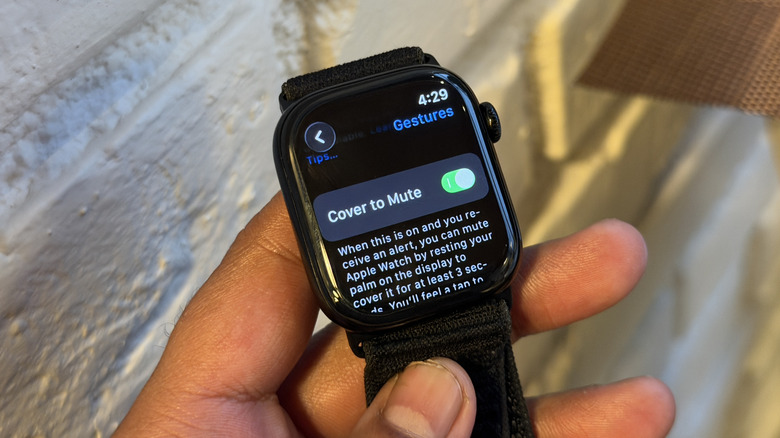
So, how does the whole slap-to-sleep system work on the Apple Watch? Well, it's actually part of a dedicated gesture that you can enable directly on the Apple Watch. In the latest iteration of watchOS, it is available to users under the name "Cover to Mute." As per the official description on Apple's support page, this feature lets you silence incoming alerts, such as phone calls or task reminders, by simply placing your palm on the screen for three seconds. Once the palm has rested still, covering the display for that duration, you will feel a vibration to indicate that the incoming alert has been silenced. To enable this feature, you must first activate gesture recognition on the smartwatch. To do so, follow this path:
- Open the Settings app on your Apple Watch.
- In the Settings app, scroll down and tap the Gestures option.
- On the next page, activate the toggle corresponding to the Gestures option at the top.
- Now, scroll down on the same page and do the same for the "Cover to Mute" option.
Notably, there is another similar gesture baked within watchOS that doesn't require a three-second gesture. Instead, you can simply tap with your palm on the screen to turn off the display. Apple notes that if you have always-on display mode enabled, tapping lightly anywhere on the screen will turn off the display, leaving you with a blank slate. This is a clever trick to conserve battery when you're running low on juice. Notably, you can even use it as a gesture to return to the watch face, regardless of which application is currently open on the Apple Watch's screen.


